A real PLC,
within everyone's reach.
MiaPLC is an ESP32-based PLC programmed in ladder from an editor in your browser, with networks, functions, data blocks, Online view and diagnostics, just like on the factory floor. For a few euros you get a real board on your bench and start learning industrial automation.
When I was at school, a PLC was the Holy Grail.
It cost too much to put one in every student's hands: labs had a few, always the same ones, and we looked at them more than we used them. If you wanted to practise at home, you simply couldn't.
Today a microcontroller costing a few euros has power that was unthinkable back then, and modern tools, artificial intelligence included, let a single person build something that truly gets close to the industrial world.
I spent my time building this version of a PLC: very similar to the ones you find in real plants, but made on cheap, open hardware.
“MiaPLC is not only about cutting costs for schools. It's about starting a path: the concepts you learn here are the same ones you'll find in the development environments of the big automation brands. And in the meantime you can use it for a serious hobby project.”— Denys, PLC & Automation Engineer
- One board per student, not one per lab
- Programmed from the browser: no licences, nothing to install on school PCs
- The same ideas as industry: scan cycle, networks, FCs, DBs, Online
- Free software (GPL-3.0): you can study how it works inside, too
A complete PLC inside an ESP32
The firmware runs your program in a bytecode virtual machine, scan after scan. The editor is served by the PLC itself: open it in the browser and start programming.
Ladder like in the factory
Networks with title and comment, contacts, coils, SET/RESET, edges, comparisons, math and conversion boxes.
Editor in the browser
Nothing to install: the editor runs on the PLC. Compile, Download, Run, the way you're used to.
Online and diagnostics
Watch power flow through contacts, timers counting, DB values changing. Event log, scan times, RAM.
Structured blocks
Main, StartUp, functions (FC) with an interface, retentive DBs, structures, arrays. FCs in ST and C too.
Timers, counters, numbers
TON, TOF, TP, CTU, CTD, CTUD; types from BOOL to REAL and TIME; linear scaling for analog values.
Communication
Ethernet and WiFi, Modbus TCP, µLink remote I/O modules, touch HMI panel.
Program in ladder, watch it work live
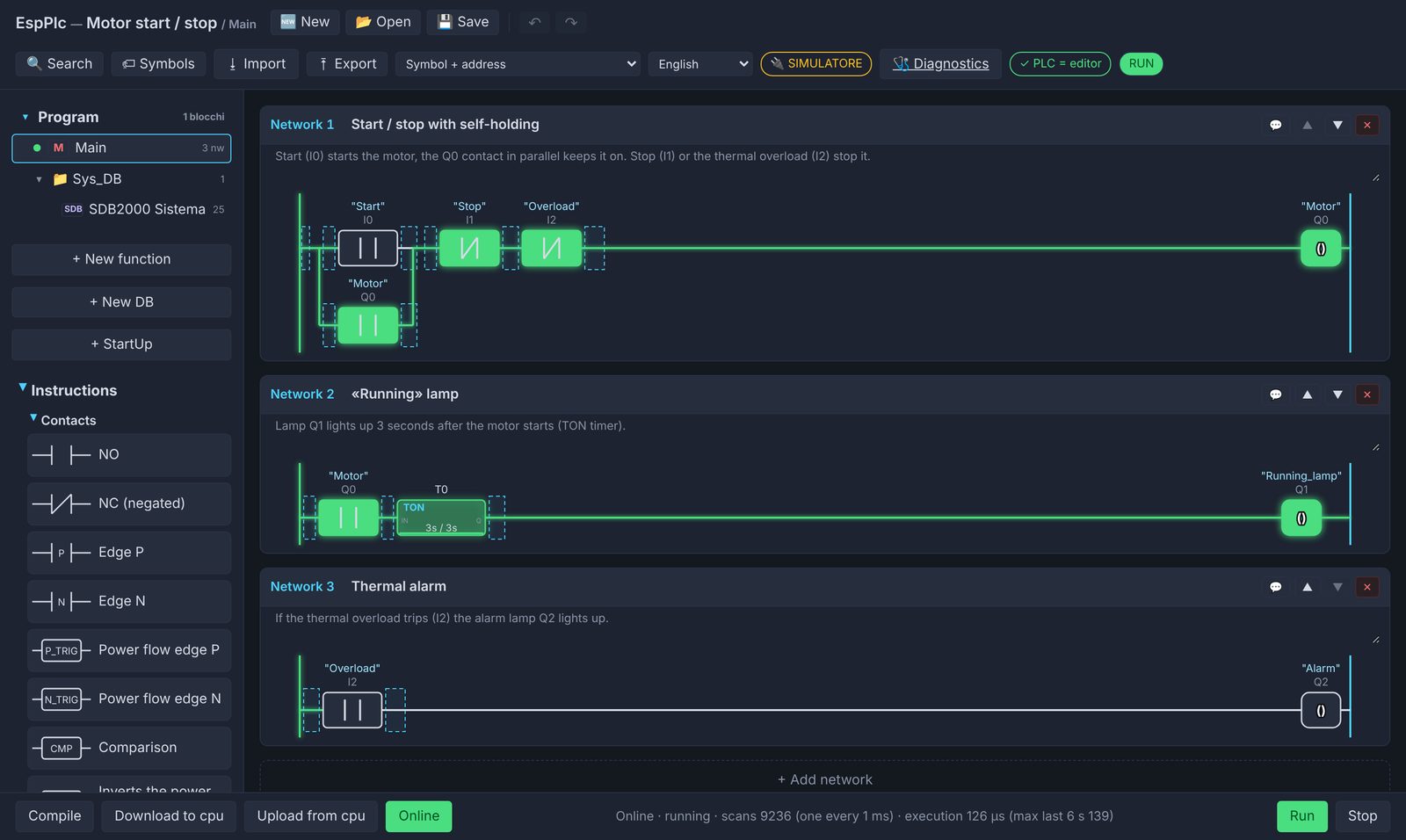
Motor start/stop with self-holding, in Online view: closed contacts and energised coils turn green.
- Symbol table and cross-references
- System bits: first scan, 1/2/10 Hz clocks
- Multilingual interface
- Firmware update from the editor or over USB
- RAM and scan time analysis
- PLC backup and restore
From the school bench to the garage project
Schools and technical institutes
Automation labs with one board per student, no software licences, and a cost that pays for itself straight away.
Students and self-learners
Practise at home with the same concepts you'll use at work. And with the simulator, even without a board.
Makers and hobbyists
Gates, greenhouses, aquariums, home systems, test benches: proper relay logic instead of a makeshift sketch.
Technicians and prototypes
Quick tests, small automations, in-company training. For safety functions, use a safety PLC.
Four pieces working together
Firmware and editor
The PLC virtual machine, the scan cycle, the modules (network, clock, I/O) and the web editor.
Configurator
Draw your board (inputs, outputs, Ethernet, clock) and it builds the firmware. Windows, Linux, macOS.
Remote I/O
A wired-Ethernet bus for I/O modules: other ESP32 boards or even an Arduino Uno with a W5100/W5500 shield.
Operator panel
A 10.1" touch panel on ESP32-P4 that reads and writes PLC data.
Reference boards
| Chip | Example | Notes |
|---|---|---|
| ESP32 | Olimex ESP32-EVB | on-board Ethernet, relays, optional DS3231 clock |
| ESP32-C3 | small modules + W5100 / W5500 | the cheapest option, also as a µLink I/O module |
| ESP32-S3 | ESP32-S3-DevKitC-1 | more memory for large programs |
| ESP32-P4 | boards with Ethernet | the most powerful; also the base of the HMI panel |
Try it now, no board needed
The editor runs in your browser with a simulated PLC: load an example, press Download and Run, switch the inputs on and watch the ladder work.
Let's talk
Are you a teacher who'd like to try MiaPLC in the lab? Do you have a project and want to know if it fits? Want to help out, report a problem or suggest an idea? Write to me.
Schools
Available for teaching pilots and to help prepare exercises that match the course syllabus.
Source code
Firmware, editor and configurator are free software (GPL-3.0), under the miaplc organisation on GitHub.